
The Deployment Gap
Deploying soup methods as standard opaque meshes in a game engine causes severe visual collapse (up to 15.64 dB PSNR drop on Mip-NeRF 360). MeshSplatting exhibits the greatest resilience (dropping only 4.89 dB) due to surface-constrained geometry.
The Fidelity-Speed Tradeoff
Custom Engine Deployment recovers 2.69–10.76 dB PSNR by retaining soft coverage, view-dependent SH, and alpha compositing, but incurs a 5×–33× slowdown (e.g., 70 vs. 2,294 FPS) relative to Standard Mesh Deployment.
Topological Illusion
Shared vertex indexing does not ensure a valid manifold mesh. Structural audits reveal 18–28% non-manifold edges, 65–87% non-manifold vertices, and up to 712.9K fragmented components on Mip-NeRF 360.
Unified Engine Pipeline
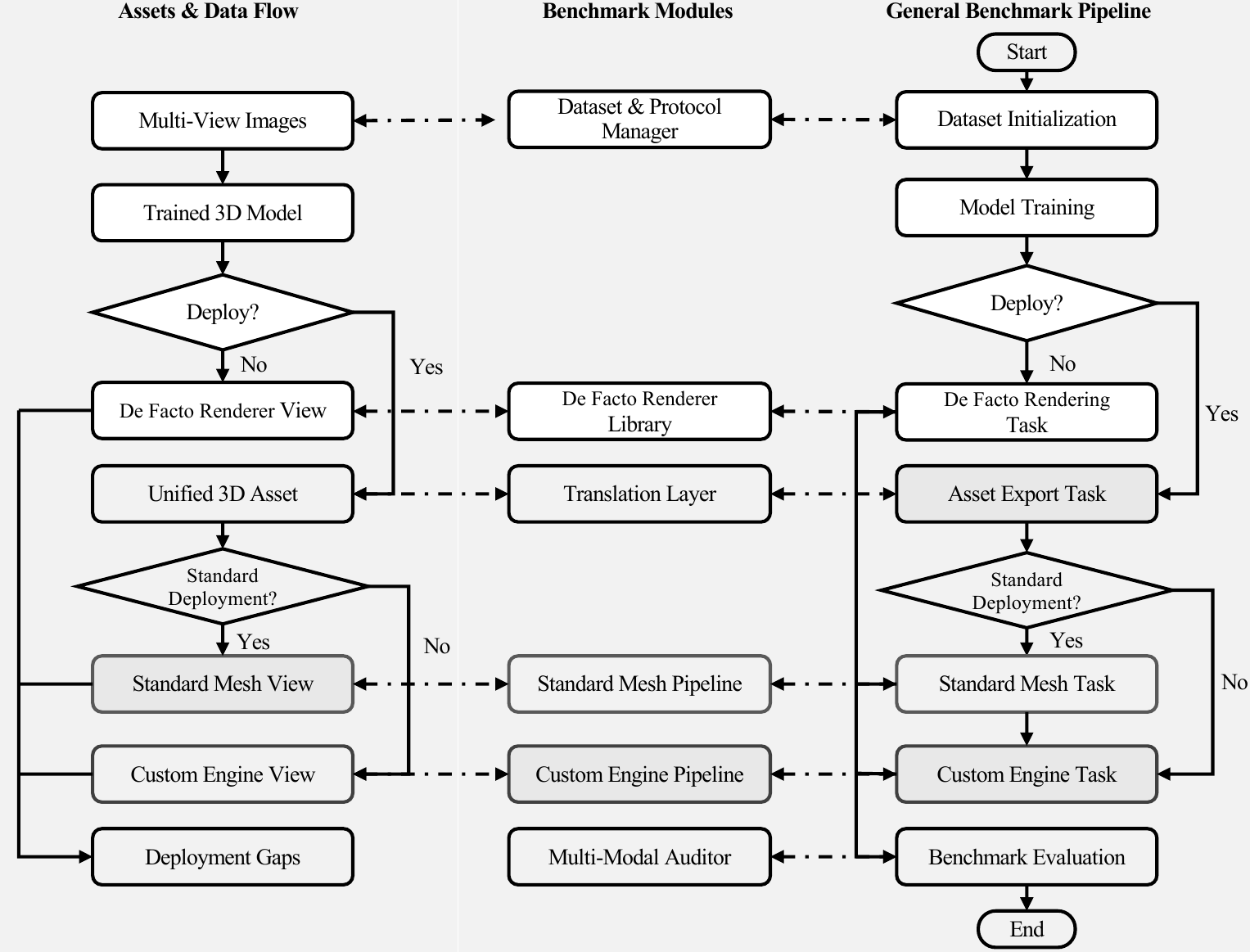
A modular architecture spanning Dataset Management, Algorithm Pool, Model Training, universal .triasset serialization, production Unity shaders, and automated headless batch evaluation.
Abstract
Triangle- and mesh-based neural rendering aims to bridge neural scene representations and existing graphics engines (e.g., Unity, Blender) by leveraging triangle primitives compatible with standard rasterization hardware. There have been several such methods driven by parallel efforts, developed and evaluated under inconsistent settings, with little or no comparison with each other; critically, most even have never used graphics engines for evaluation nor considered deployability in practice — significantly undermining the objective and motivation.
To address these issues, we introduce MeshSuite, the first benchmark of its kind to enable systematic evaluation of graphics-engine deployment and the De Facto Renderer for triangle- and mesh-based neural rendering methods. Importantly, our deployment protocol includes two engine deployment settings:
- (1) Standard Mesh Deployment — a conventional opaque mesh pipeline with vertex colors and hardware Z-buffering;
- (2) Custom Engine Deployment — adding method-specific engine implementations supporting the retained appearance and compositing features (e.g., alpha blending), so that the characteristics of each specific model can be taken into account.
For mesh splatting, we further propose a structural audit of exported surfaces, diagnosing topological and geometric integrity toward downstream graphics assets. We highlight several key findings:
- Graphics engine deployment incurs image-quality degradation under both deployment options. Among the triangle- and mesh-based NVS methods studied, MeshSplatting degrades the least under Standard Mesh Deployment.
- The deployment setting matters — Custom Engine Deployment can retain the majority of fidelity at a roughly 5–33× slowdown relative to Standard Mesh Deployment across the two deployment datasets.
- About mesh splatting, current approaches to explicit connectivity and shared indexing are still limited: shared vertex indexing alone does not ensure manifoldness or global connectivity.
From this benchmark, we validate that rasterizability is merely part of graphics readiness, and highlight the significance of assessing the graphics engine deployment process (e.g., the degree of engine compatibility).
4-Way Synchronized Image Split Comparison
Comparing novel-view synthesis across Standard Mesh Deployment → Custom Engine Deployment → De Facto Renderer → Ground Truth. Drag the vertical divider lines to dynamically adjust the visible split regions!



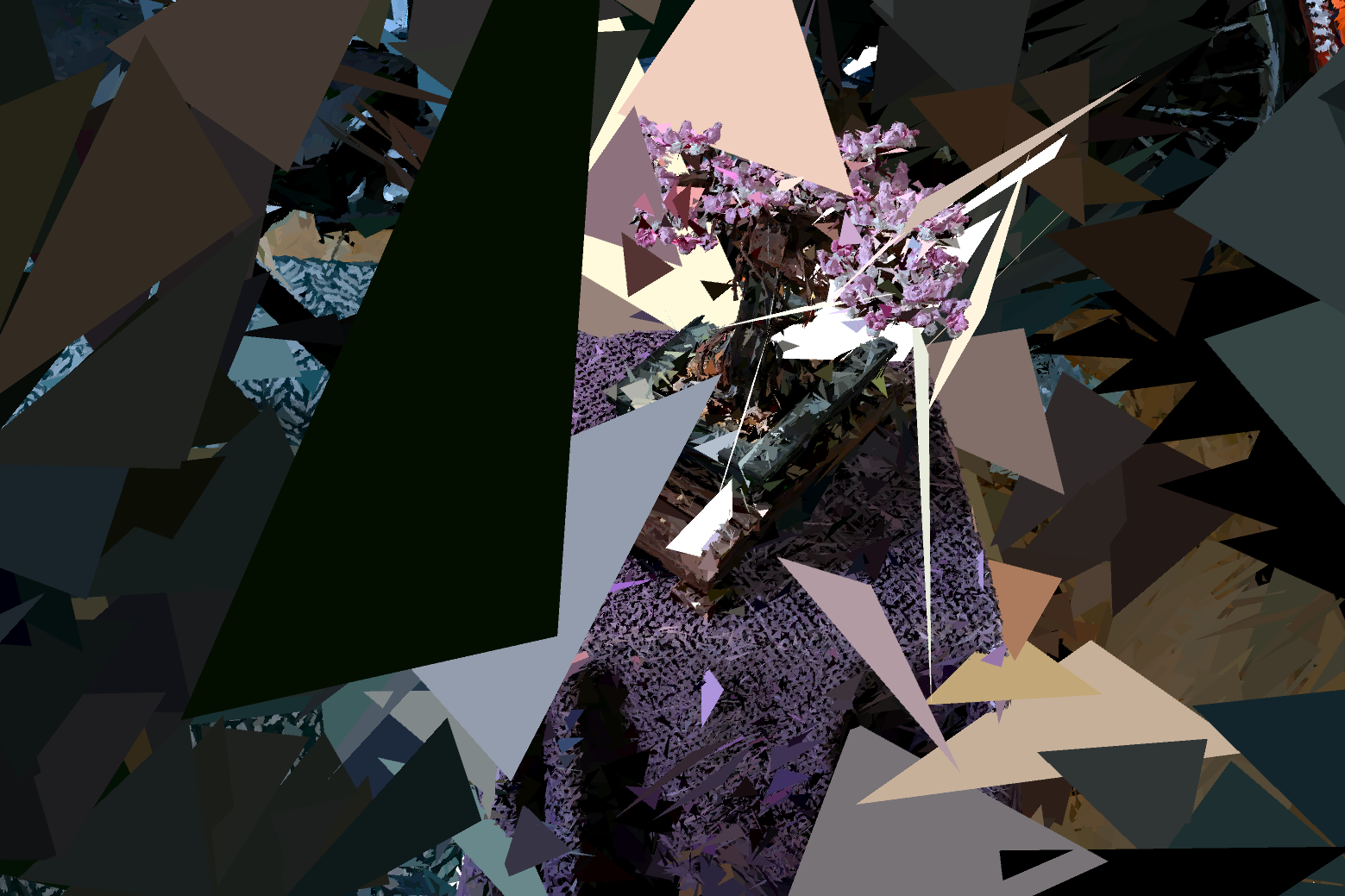
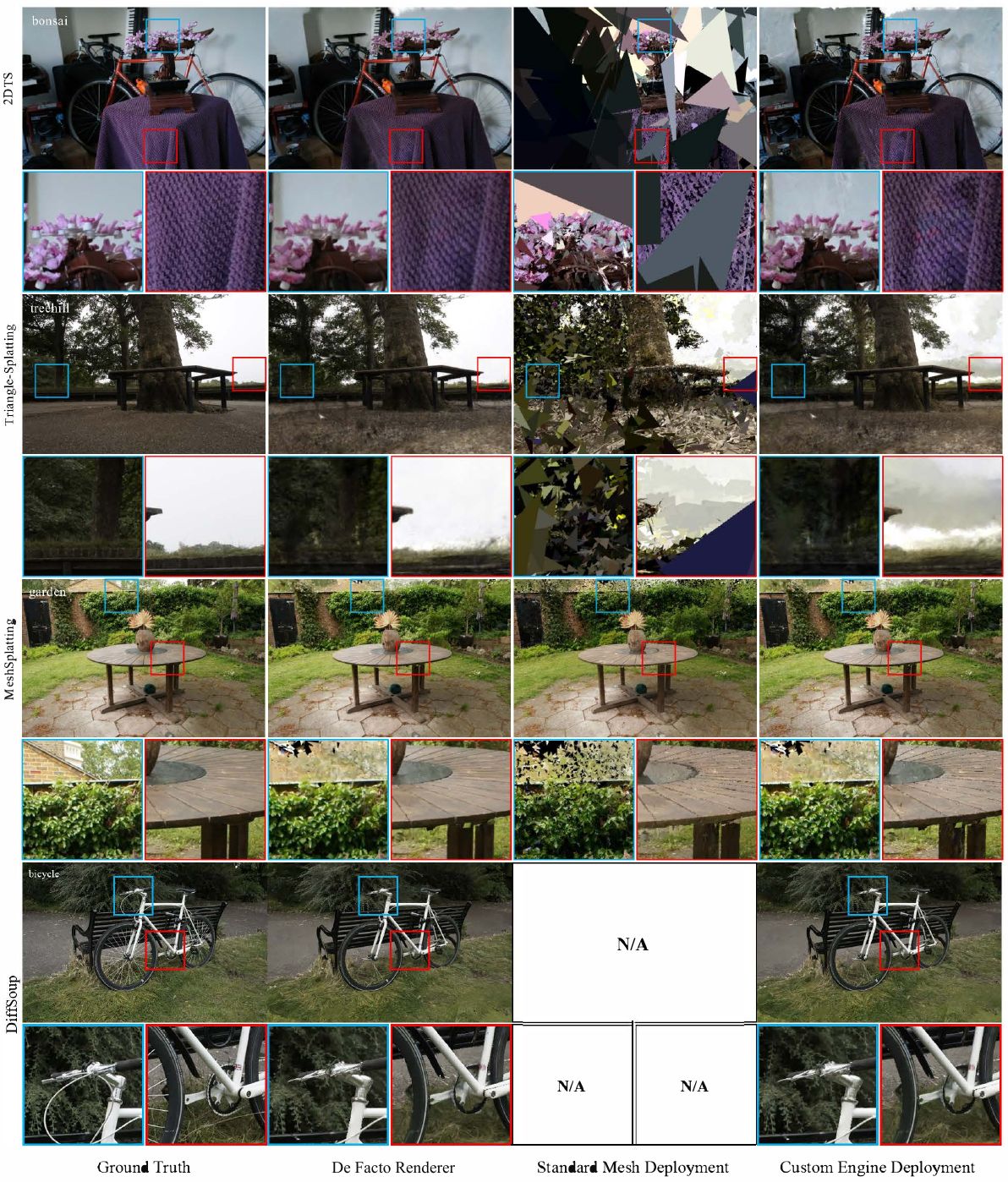
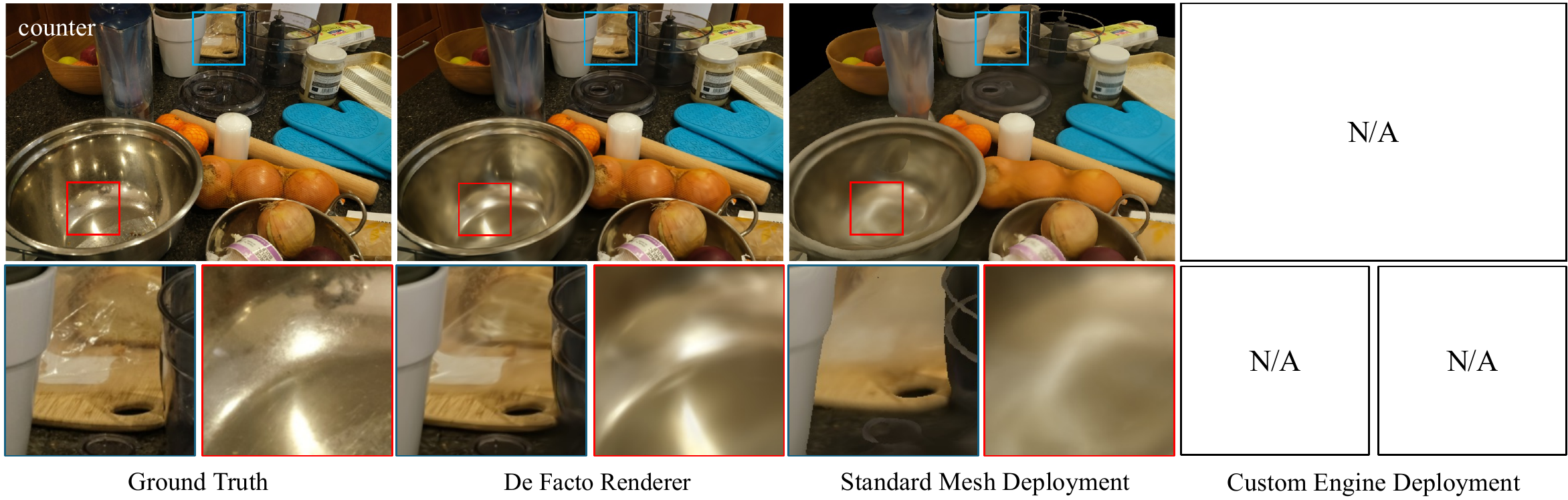
Qualitative Novel-View Synthesis Comparisons
Side-by-side visual inspections on Mip-NeRF 360 across Ground Truth, De Facto Renderer, Standard Mesh Deployment, and Custom Engine Deployment.
The Three Evaluation Settings
Systematically dissecting the transition from research CUDA kernels to engine rasterization.
1. De Facto Renderer
Evaluated directly using each method's official source research renderer (differentiable CUDA kernels). Serves as the reference fidelity benchmark and upper bound before graphics-engine deployment.
- Official source paper rasterization
- Unconstrained continuous opacity
- Not usable in conventional game engines
2. Standard Mesh Deployment
Converts trained models to conventional opaque meshes with static vertex colors rendered using standard hardware Z-buffering in Unity. Omits custom shaders and alpha blending.
- Blazing fast (up to 5,480 FPS)
- 100% plug-and-play standard CG asset
- Massive quality collapse for soups (8–15 dB drop)
3. Custom Engine Deployment
Method-specific Unity renderers retaining appearance and compositing features (view-dependent spherical harmonics, soft window coverage, depth sorting, and neural texture decoding).
- Recovers 2.69–10.76 dB PSNR
- In-shader neural Micro-MLP decoding
- 5×–33× slower than Standard Mesh
Engine Support and Retained Rendering Features (Table 1)
| Method | Standard Mesh Deployment | Custom Engine Deployment | ||||||
|---|---|---|---|---|---|---|---|---|
| Support | Appearance | Support | View-dep. SH | Opacity | Soft Coverage | Depth Sort | Appearance Model | |
| 3DGS (Reference) | N/A | N/A | ||||||
| 2DGS (TSDF Mesh) | Fallback | baked color | N/A | |||||
| 2DTS | Fallback | baked SH-DC | Method-aware | SH | ||||
| Triangle-Splatting | Fallback | baked SH-DC | Method-aware | SH | ||||
| MeshSplatting | Fallback | baked SH-DC | Method-aware | — | SH | |||
| DiffSoup | N/A | Method-aware | — | — | — | — | In-Shader Micro-MLP | |
Benchmark Leaderboards
Standardized novel-view synthesis, throughput, memory allocation, and geometry quality.
| Setting | Method | Type | PSNR ↑ | SSIM ↑ | LPIPS ↓ | Throughput (FPS) ↑ | GPU Latency (P50 ms) ↓ | VRAM / Alloc ↓ |
|---|---|---|---|---|---|---|---|---|
| De Facto Renderer | 3DGS (Reference) | Gaussian Splats | 27.21 | 0.815 | 0.214 | 109 | — | — |
| 2DGS (Reference) | Surface Gaussians | 26.79 | 0.796 | 0.252 | 38 | — | — | |
| 2DTS | Triangle Soup | 28.16 | 0.841 | 0.215 | 70 | — | 10,069 MiB (Train) | |
| Triangle-Splatting | Triangle Soup | 27.13 | 0.812 | 0.227 | 94 | — | 18,901 MiB (Train) | |
| DiffSoup | Neural Texture Soup | 23.54 | 0.689 | 0.322 | 168 | — | 23,484 MiB (Train) | |
| MeshSplatting | Indexed Mesh | 24.72 | 0.729 | 0.365 | 38 | — | 23,134 MiB (Train) | |
| Standard Mesh Deployment (Unity) | 2DGS (TSDF) | Opaque Mesh | 12.70 | 0.311 | 0.594 | 2,778 | 0.4 ms | 54 MiB |
| 2DTS | Opaque Soup Shards | 12.52 | 0.311 | 0.661 | 3,754 | 0.3 ms | 54 MiB | |
| Triangle-Splatting | Opaque Soup Shards | 14.77 | 0.246 | 0.656 | 2,294 | 0.5 ms | 54 MiB | |
| MeshSplatting | Delaunay Mesh | 19.83 | 0.491 | 0.518 | 943 | 1.1 ms | 54 MiB | |
| Custom Engine Deployment (Unity) | 2DTS | Custom Alpha Splat | 23.28 | 0.699 | 0.313 | 545 | 2.1 ms | 1,140 MiB |
| Triangle-Splatting | Custom Window Splat | 22.96 | 0.695 | 0.301 | 70 | 3.8 ms | 1,559 MiB | |
| DiffSoup | Compute Micro-MLP | 23.15 | 0.647 | 0.331 | 1,995 | 0.5 ms | 288 MiB | |
| MeshSplatting | Indexed Alpha Mesh | 22.52 | 0.589 | 0.457 | 157 | 6.4 ms | 927 MiB |
Quality vs. Efficiency Trade-Off
How image fidelity transitions to framerate across Standard Mesh Deployment, Custom Engine Deployment, and De Facto Renderer.
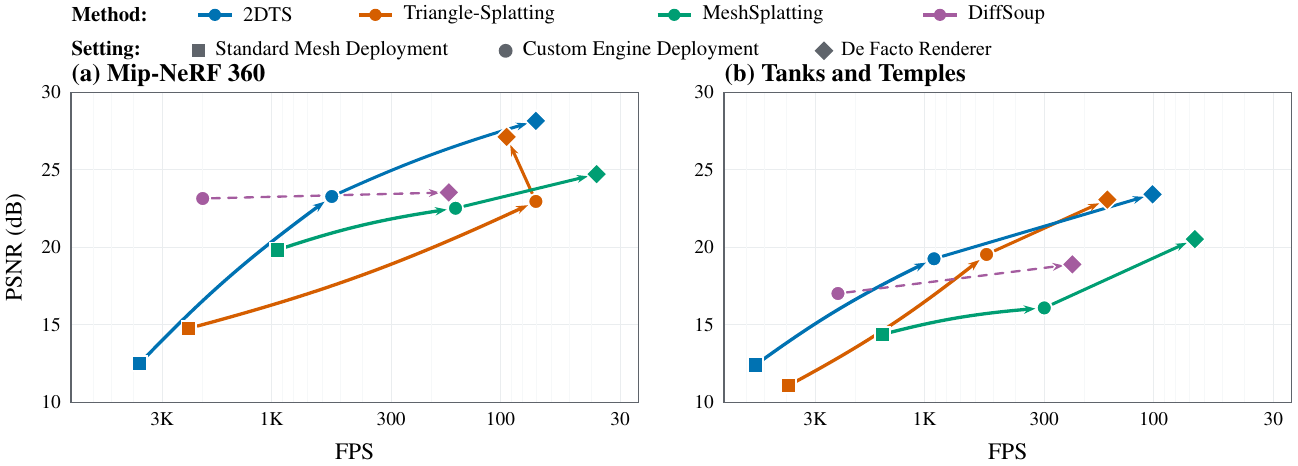
Fidelity vs. Throughput Trajectories
Quality–efficiency trade-off across the three evaluation settings on (a) Mip-NeRF 360 and (b) Tanks and Temples. Trajectories connect Standard Mesh Deployment (■) to Custom Engine Deployment (•) and De Facto Renderer (◆). Standard Mesh Deployment hits thousands of FPS (up to 5,480 FPS) via hardware Z-buffering but incurs severe visual drops. Custom Engine Deployment recovers quality at the expense of throughput (70–2,388 FPS).
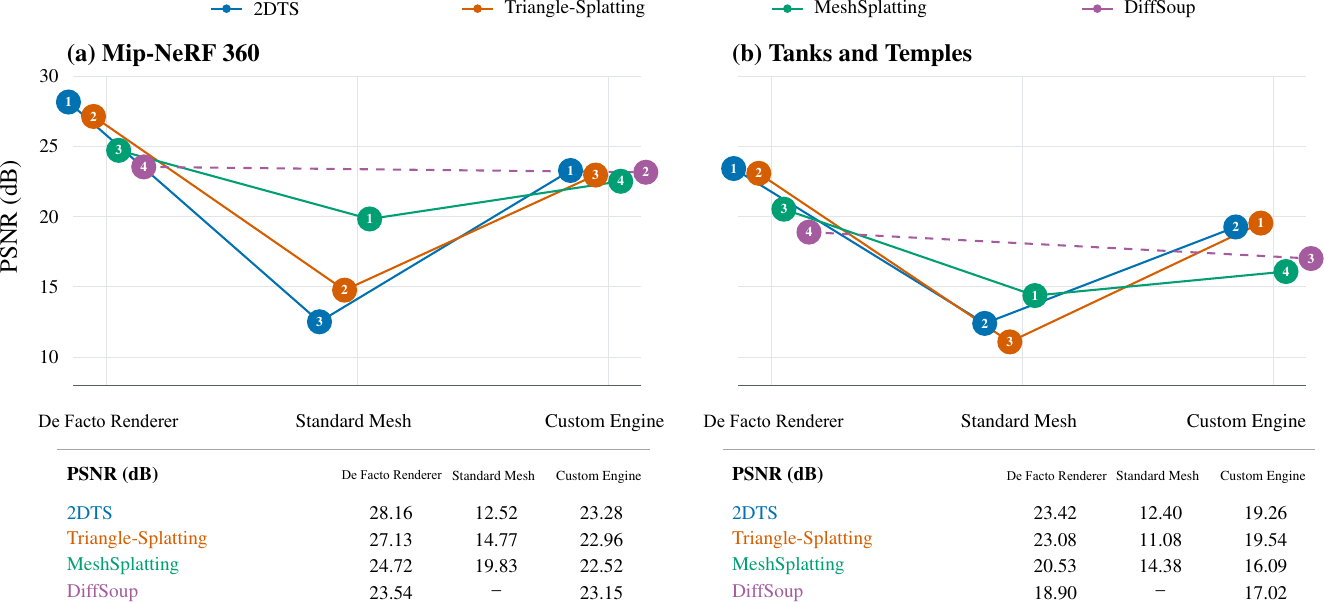
Deployment Gaps Across Datasets
Deployment gaps for the four triangle- and mesh-based methods on Mip-NeRF 360 and Tanks and Temples. Illustrates the adaptation gap (ΔQadapt from De Facto to Custom Engine), portability gap (ΔQport from Custom Engine to Standard Mesh), and overall deployment gap (ΔQdeploy). MeshSplatting exhibits the smallest deployment gap (ΔQdeploy = 4.89 dB on Mip-NeRF 360).
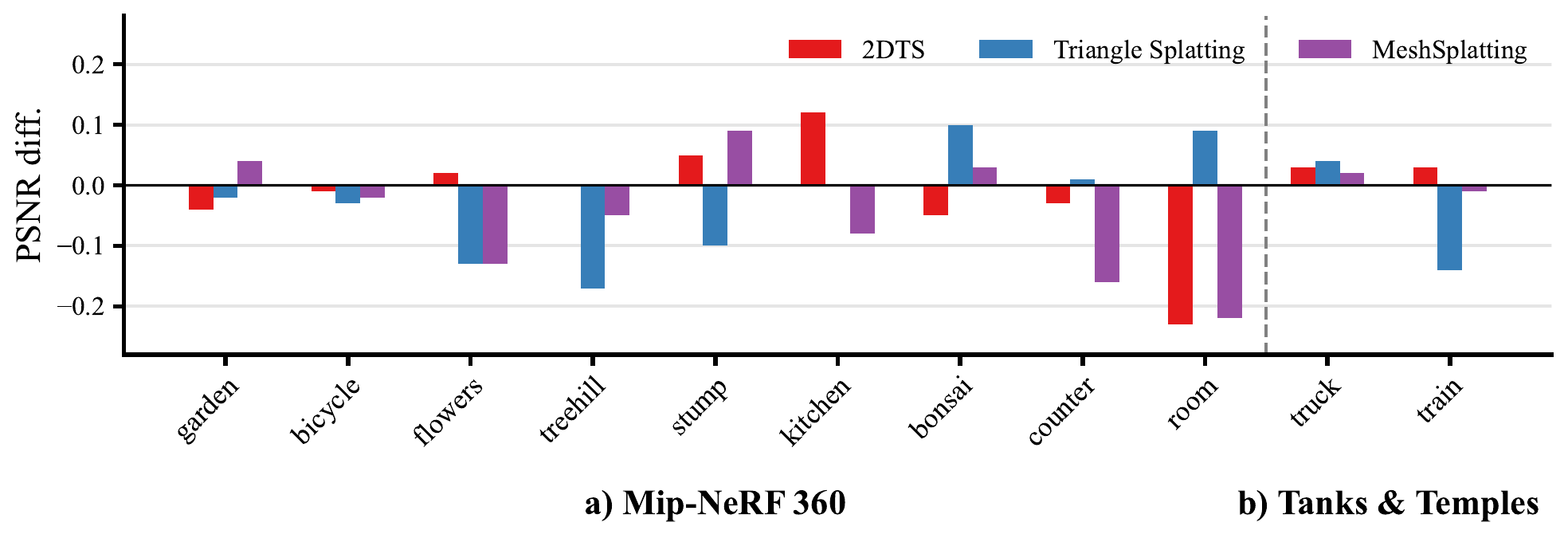
Reproduction Fidelity Audit
Per-scene PSNR reproduction differences (PSNRMeshSuite − PSNRpaper) on (a) Mip-NeRF 360 and (b) Tanks and Temples. Across all tested scenes and methods, the largest relative deviation is strictly below 0.8%, validating the experimental fidelity and consistency of MeshSuite.
Structural Audit of Exported Meshes
Does explicit triangle indexing ensure a viable 3D asset for physics, animation, and downstream CG pipelines?
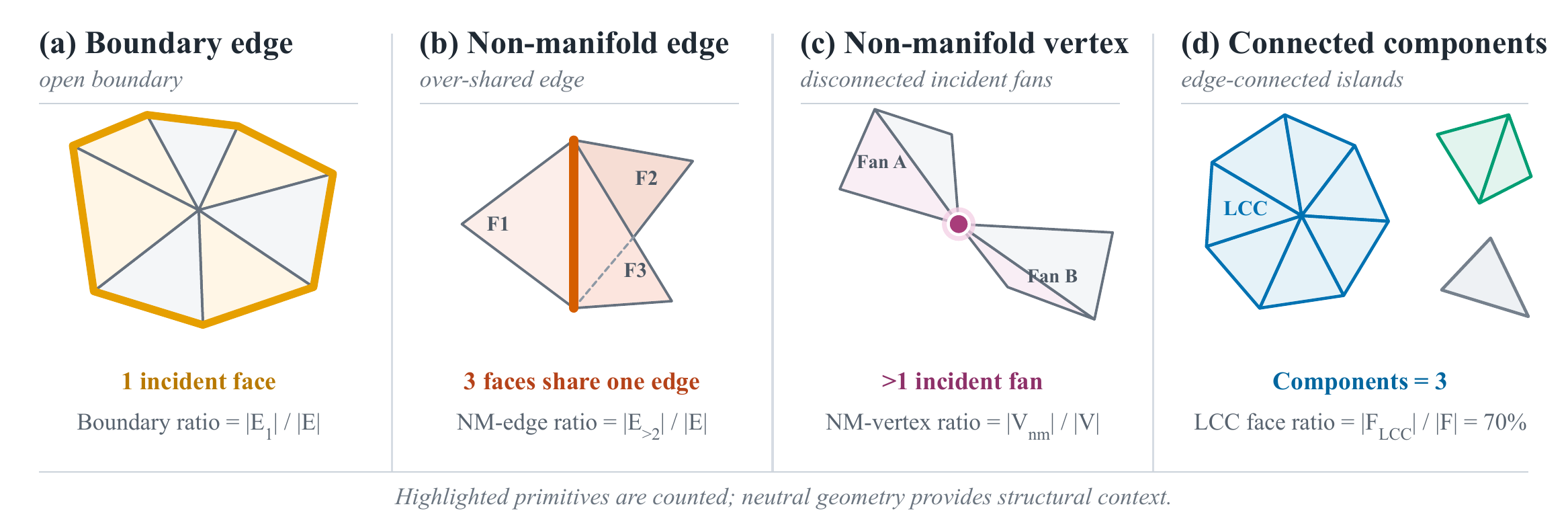
Mesh Diagnostics for MeshSplatting across All Benchmark Datasets (Table 5)
| Dataset | Local Reuse | Local Structure Defect Rate | Global Connectivity & Fragmentation | |||||
|---|---|---|---|---|---|---|---|---|
| V / F Ratio | Valence | Boundary Edges | Non-Manifold Edges ↓ | Non-Manifold Verts ↓ | LCC Faces ↑ | LCC Area ↑ | Components (K) ↓ | |
| Mip-NeRF 360 | 0.523 | 6.49 | 45.4% | 17.8% | 65.2% | 69.9% | 68.9% | 712.9 K |
| Tanks & Temples | 0.516 | 6.49 | 46.1% | 18.2% | 66.5% | 69.9% | 66.6% | 442.8 K |
| DTU | 0.428 | 7.36 | 41.2% | 22.2% | 72.7% | 76.9% | 77.5% | 43.3 K |
| NeRF-Synthetic | 0.339 | 8.59 | 37.2% | 28.4% | 87.3% | 80.4% | 80.4% | 65.8 K |
Unity Engine Integration & Shaders
Exporting feature-preserving .triasset formats and executing custom rendering passes.
MethodSpecificSplat.shader
Procedural Splatting Shader
Implements differentiable window evaluations, view-dependent spherical harmonics, and ordered multi-pass alpha blending directly in Unity's graphics pipeline.
MeshSplatIndexedMesh.shader
Indexed Mesh Shader
Consumes shared vertex buffers and face index buffers with per-vertex spherical harmonics colors, bypassing redundant vertex transmissions.
DiffSoupMetal.shader
In-Shader Micro-MLP Decoder
Evaluates neural texture latents inside a custom compute shader on Metal/Vulkan, executing lightweight MLP forward passes in real-time at ~2,000 FPS.
StandardVertexColorRaw.shader
Standard Opaque Baseline
Evaluates conventional game-engine opaque mesh rendering with static vertex colors and hardware Z-buffering for standard deployment comparisons.
3-Way Synchronized Video Split Comparison
Real-time camera orbit videos rendered across Standard Mesh Deployment → Custom Engine Deployment → De Facto Renderer. Drag the vertical divider lines to dynamically adjust the visible split regions!
Installation & CLI Usage
Reproduce training, export .triasset packages, and profile framerates in Unity.
# Clone the unified benchmark repository
git clone https://github.com/prinasi/MeshSuite.git
cd MeshSuite

# Option 1: Conda Environment (Recommended)
conda env create -f environment.yml
conda activate msbench

# Option 2: Pip editable install with compiled CUDA rasterizers
pip install -e ".[dev,cuda]" --no-build-isolation
BibTeX
@article{zhang2026meshsuite,
  title   = {MeshSuite: A Unified Benchmark for Triangle- and Mesh-Based Neural Rendering},
  author  = {Zhang, Kaixuan and Li, Minxian and Ren, Mingwu and Zhu, Xiatian},
  journal = {arXiv preprint arXiv:2609.01306},
  year    = {2026},
  url     = {https://arxiv.org/abs/2609.01306}
}